Blog
Guides to never missing a meeting again
How iPhone alarms, calendar notifications and Focus actually interact, and what to do when the reminder never arrives. Written by the person who builds Pealo.
Topics:
- Silent Mode
- Focus and DND
- Google Calendar
- Outlook
- AlarmKit
- Multiple accounts
- Missed meetings
- Alarm sounds
- Lock Screen
What is this blog about?
Practical guides about getting a sound you cannot miss out of a calendar you did not fill in yourself. Most articles answer one specific question — why a reminder was silent, which apps make real alarms, how to handle several accounts — and are updated when iOS or Android changes the behaviour they describe.
Featured
Why don't calendar reminders wake you up?
Silent Mode mutes them, Focus hides them, and they vanish in a second. The full explanation, and the three things that do ring.
Read article →
Team StandUp in 15 minutes
Team StandUp
Does Low Power Mode Stop Alarms on iPhone?
Low Power Mode does not silence iPhone alarms, but it can delay how calendar alarm apps sync new events. Here is what actually changes.
Read article →
How to Sync Yahoo Calendar on iPhone (2026 Guide)
Sync Yahoo Calendar on iPhone the right way, fix accounts stuck on IMAP, and turn Yahoo events into alarms that ring through Silent mode with Pealo.
Read article →
CarPlay Calendar Notifications Not Working? Fix It
Calendar alerts silent in CarPlay? Driving Focus, app notification settings, and iOS limits explain it. Here is what to check and what actually rings.
Read article →
Calendar Invite Not Syncing on iPhone? Full Fix
Calendar invite not syncing from email on iPhone? Check IMAP vs Exchange setup, account sync toggles, and the .ics flow that actually adds events.
Read article →
Outlook Shared Calendar Reminders Not Ringing? Fix It
Shared and delegated Outlook calendar reminders often never reach iPhone because they fire from the owner mailbox, not yours. Here is why, and the fix.
Read article →
Google Calendar Notifications Missing in Gmail? Fix It
Google Calendar email notifications not showing in Gmail? Learn why the two apps split alerts, fix the settings, and see why alarms beat email for meetings.
Read article →
Shared Google Calendar Not Showing on iPhone? Fix It
Shared Google Calendar not showing on iPhone? Use calendar.google.com/syncselect to re-enable it, then check iOS Calendar app settings. Full fix below.
Read article →
Apple Watch Alarm Too Quiet? Fix the Volume
Apple Watch alarm too quiet to hear? Turn off Automatically Adjust Volume, max the slider, and set Haptics to Prominent. Full fix for watchOS 26.
Read article →
Apple Watch Silent Mode: Will Meeting Alarms Ring?
Apple Watch silent mode mutes sound but not always haptics. Learn what gets through for meetings, and when a real alarm beats a quiet calendar tap.
Read article →
Scheduled Summary Delaying Calendar Alerts? Fix It
Scheduled Summary holds calendar notifications for hours, not minutes. Learn why it delays iPhone calendar alerts and how to get meeting warnings back on time.
Read article →
Banner Notifications vs Alarms: Which Wakes You Up
Banner notifications and alarms look similar but behave differently on iOS. See how alert styles, silent mode, and Focus change what actually wakes you.
Read article →
Fix AlarmKit Permission Denied on iPhone (iOS 26)
AlarmKit permission denied means alarms stay silent. Here is how to check alarm authorization iOS 26, enable AlarmKit settings, and fix it for good.
Read article →
Why Snoozing a Calendar Alarm Backfires
Snoozing a calendar alarm before a meeting rarely buys you rest and often costs you focus. Here is what actually happens when you tap snooze.
Read article →
Outlook Admin Center: Calendar Reminder Policies Explained
How IT admins set Exchange default reminder policy across a tenant, what Outlook admin center calendar settings control, and what users can still override.
Read article →
Exchange Calendar Alarm Not Ringing? Fix It
Exchange calendar alarm not working on iPhone? Fix ActiveSync notification settings, Focus mode blocks, and sync issues that keep work events silent.
Read article →
AlarmKit Permission in iOS Settings: What It Controls
The AlarmKit permission in iOS Settings decides if an app can ring through Silent mode. Here is exactly what the toggle does, and does not, control.
Read article →
iCloud Calendar Duplicate Events? How to Fix Them
iCloud calendar duplicate events usually trace to double-synced accounts, subscribed calendars, or a stuck sync. Here is how to find the real cause and fix it.
Read article →
Outlook Reminder Wrong Time? Fix the Time Zone Bug
Outlook reminder firing an hour early or late? Here is why the time zone mismatch happens across Windows, Mac, web, and mobile, and how to fix each layer.
Read article →
Google Calendar Daily Agenda Email: Setup and Fixes
Turn on the Google Calendar daily agenda email, fix it when daily agenda not sending, and see why a morning summary beats an unread inbox item.
Read article →
Custom Focus Mode for Meetings: Full iOS Setup
Build a custom Focus profile for meetings on iPhone: allowed apps, calendar filters, schedules, and why calendar alerts still need a real alarm.
Read article →
How to Decline a Meeting Without Guilt or Burning Bridges
Learn how to decline a meeting invite the right way: what to say, when to propose a new time, and how calendar etiquette keeps your schedule sane.
Read article →
Back-to-Back Meeting Day Checklist That Actually Works
A back to back meetings checklist for calendar overload and meeting fatigue, with buffer tactics and alarm setups that hold up when the day is fully booked.
Read article →
Deep Work Focus Mode: Pairing It With Real Alarms
Deep work focus mode only silences notifications, not alarms. Learn how to protect deep work blocks with focus mode alarms that still ring on time.
Read article →
Async Calendar Etiquette for Remote Teams
Clear rules for calendar block habits, meeting invite best practices, and async calendar etiquette that keep distributed teams from colliding across time zones.
Read article →
Back-to-Back Meetings With No Buffer? Fix the Gaps
No buffer time between meetings causes stress to stack across the day. Use Speedy Meetings, calendar rules, and alarms to rebuild the gaps.
Read article →
Modified Occurrence Alarm: Recurring Event Exceptions
When one occurrence of a recurring meeting moves, does the alarm move with it? How EXDATE and RECURRENCE-ID exceptions sync — and when they silently don't.
Read article →
Apple Watch Alarm While Charging: Does It Ring?
Yes, an Apple Watch alarm rings while charging via Nightstand mode — but sleep-schedule alarms behave differently. Here is what actually happens overnight.
Read article →
Outlook vs iCloud Calendar Alarms: Which Actually Rings?
Outlook vs iCloud calendar alarms compared: how each syncs to iPhone, why reminders go silent, and why neither one rings through Silent mode.
Read article →
AlarmKit Snooze vs Clock App Snooze: What's Different
AlarmKit snooze and Clock app snooze look similar but work differently. See how iOS 26 snooze settings, duration limits, and custom alarms compare.
Read article →
Google Calendar Notifications Delayed on iPhone? Why
Google Calendar reminder showing up late or at 3am? Here is why notifications lag on iPhone, which settings control it, and how to actually fix the delay.
Read article →
Focus Filters and Calendar: What They Hide, What They Don't
Focus filters hide calendars from view and block notifications, but they do not stop synced events, silence AlarmKit alarms, or delete data. Here is what actually happens.
Read article →
Calendar Notification vs Alarm on iPhone: Key Differences
Calendar notifications on iPhone use Apple push notifications; alarms use AlarmKit. One stays silent in Focus, the other rings through it. Full breakdown.
Read article →
AlarmKit Authorization: What Users Actually Approve
AlarmKit permission prompt explained: what text users see, how it differs from notification permission, and what happens if someone taps Don't Allow.
Read article →
Time-Sensitive Notifications vs AlarmKit: What Changed
Time-sensitive notifications break through Focus but not silent mode. AlarmKit breaks through both. Here is what changed with iOS 26 and why it matters.
Read article →
Can You Snooze a Calendar Alarm on iPhone?
Stock Calendar alerts on iPhone can't snooze reliably. Learn why, how AlarmKit snooze works in iOS 26, and how to get a real snooze on meeting alarms.
Read article →
Calendar Notifications Not Showing on Lock Screen? Fix
Calendar alerts missing from your Lock Screen? Check Allow Notifications, Focus filters, Show Previews, and notification style settings to fix it fast.
Read article →
Apple Watch Nightstand Mode for Morning Meeting Alarms
Learn how Apple Watch Nightstand Mode works as a bedside meeting alarm, where it falls short for calendar alerts, and how to fix the gap.
Read article →
Google Calendar Duplicate Events on iPhone? Fix It
Google Calendar duplicate events on iPhone usually trace to double-added accounts or stacked subscriptions. Find the exact cause and remove it for good.
Read article →
Google Calendar Alarm Not Syncing on iPhone? Fix It
Google Calendar alarm not syncing on iPhone? Check the Calendars toggle, fetch settings, syncselect page, and alarm-app permissions to fix missed events.
Read article →
Per-Event Alarms vs. Whole-Calendar Alarms on iPhone
Per event alarm iPhone setup vs. calendar-wide alarm rules: what Apple Calendar supports natively, where it breaks, and how to automate alarms by calendar.
Read article →
Why Outlook Reminders Differ Between Desktop and iPhone
Outlook reminders working on laptop but not phone? Here is why desktop and mobile Outlook use different sync paths, and how to fix missing iPhone alerts.
Read article →
Why Recurring Events Get the Wrong Alarm Time
A recurring event wrong alarm is usually a daylight saving calendar bug, not a glitch. Here is why the series shifts an hour, and how to fix it.
Read article →
iOS Update Reset Notification Settings? Here's the Fix
iOS updates can quietly reset alert styles, Focus filters, and app permissions. Here is how to find what changed and restore your notification settings.
Read article →
Why App Badge Icons Don't Stop Missed Meetings
App badge icons show a number, not urgency. See why unread notification counts fail as missed meeting reminders and what actually gets your attention.
Read article →
AlarmKit vs Notifications: Why Alarms Ring Louder
AlarmKit vs notifications on iOS: how the two differ, why alarms break through silent mode and Focus, and the 64-notification limit calendars hit.
Read article →
Calendar Alert Timing: Why 15 Minutes Isn't Enough
A 15-minute meeting alert leaves no room for travel, prep, or a context switch. Here is how early a calendar alert should actually fire, by meeting type.
Read article →
Google Workspace Calendar Admin Settings for Alerts
Google Workspace admin console controls calendar sharing, duration, and auto-add defaults — but not per-user reminder minutes. Here is what IT can and cannot set.
Read article →
Exchange Calendar iPhone Setup: Full ActiveSync Guide
Add a work Exchange calendar to iPhone via ActiveSync: exact Settings path, manual server fields, sync toggles, and fixes for events that import but never alert.
Read article →
Every New Alarm Feature in iOS 26
iOS 26 rebuilt the alarm from the ground up with AlarmKit, custom snooze, and a redesigned Clock app. Here is every change, explained.
Read article →
iCloud Calendar Not Syncing on iPhone: Fixes That Work
iCloud calendar not syncing on iPhone? Check these 7 settings before you panic. Fixes for missing events, stuck syncs, and events that vanished after an update.
Read article →
Outlook Calendar Reminder Settings, Explained
How to change the Outlook default reminder time, customize reminder sounds, and fix reminders that revert to 15 minutes on new meetings.
Read article →
Google Calendar Notification Settings, Explained
Where Google Calendar notification settings live, how default reminders work per-calendar, and why event notifications and email alerts behave differently.
Read article →
Deep Work Without Missing the Next Meeting
How to concentrate in Focus mode without missing meetings. AlarmKit vs notifications, lead times, and a block setup that protects deep work and alerts.
Read article →
The Weekly Calendar Review, in 10 Minutes
Learn how to review your calendar for the week in 10 minutes: catch conflicts, missing alarms, and double-bookings before Monday starts.
Read article →
Build Buffer Time Between Back-to-Back Calls
Stop meetings running into each other. Enable speedy meetings, fix Outlook auto-shorten settings, and use alarms to protect the gaps calendars ignore.
Read article →
Time Blocking That Actually Holds With Alarms
Time blocking calendar methods fail without alarms. Learn how to stick to time blocks using AlarmKit alerts that ring through Silent mode and Focus.
Read article →
A Morning Routine That Survives Remote Work
Build a morning routine remote workers can actually keep. Wake up for a 7am standup on time, every time, without a phone alarm you sleep through.
Read article →
A Meeting Preparation Checklist That Takes 5 Minutes
A 5-minute meeting preparation checklist for busy calendars: what to check, what to skip, and what to do 15 minutes before a meeting starts.
Read article →
Recurring Alarm vs Recurring Event: What Rings
A repeating calendar event isn't an alarm. Here's why your weekly meeting alert stays silent, and how to turn it into an alarm that actually rings.
Read article →
iPhone Alarm vs Apple Watch Alarm: Which Wakes You
iPhone alarm vs Apple Watch alarm compared for loudness, Silent Mode, and heavy sleepers. See which one actually wakes you and how to set up a backup.
Read article →
Google Calendar vs Outlook Reminders Compared
Google Calendar vs Outlook reminders compared: default times, sound behavior, sync gaps, and why one app reminds you when the other stays silent.
Read article →
Clock App vs Calendar Alarm App: Which Wins?
iPhone Clock alarms vs calendar alarm apps compared: reliability, Silent mode, Focus, and setup time. See which one actually gets you to every meeting.
Read article →
Google Calendar Alarm Not Ringing on iPhone? Fix It
Google Calendar alarm not ringing on iPhone? Learn why events stay silent and how to set a Google Calendar alarm that rings through Silent mode.
Read article →
How to Get an Alert Through Focus Mode on iPhone
Learn how to let calls, texts, and calendar alerts break through Focus mode on iPhone using Time Sensitive notifications, allowed people, and allowed apps.
Read article →
Calendar Notifications Not Working on iPhone? Fix It
Calendar notifications not working on iPhone? Check these 6 settings — Notifications, Focus, Default Alert Times, iCloud sync, and Silent mode — to fix it fast.
Read article →
Critical Alerts vs AlarmKit Alarms on iOS Explained
Critical alerts need Apple approval; AlarmKit alarms don't. Compare how each bypasses Silent mode, who can use them, and what that means for your apps.
Read article →
Alarm vs Reminder vs Notification on iOS Explained
Alarm, reminder, and notification look similar on iPhone but behave differently in Silent mode and Focus. Here is what actually rings, and what stays quiet.
Read article →
Set Different Alert Lead Times Per Calendar
Learn which calendar apps let you set custom lead times per calendar, how Google Calendar defaults work, and why iPhone Calendar treats every calendar the same.
Read article →
Change Calendar Notification Sound on iPhone (2026)
Change the calendar notification sound on iPhone in three steps, why the setting sometimes fails to stick, and how to make alerts loud enough to notice.
Read article →
Calendar Alarm on Apple Watch: How It Works
See how a calendar alarm reaches your Apple Watch, why haptics sometimes fail, and how AlarmKit apps like Pealo mirror meeting alerts to your wrist.
Read article →
How to Sync Multiple Google Calendars on iPhone
Add a second Google account to iPhone Calendar, fix hidden work calendars, and stop duplicate events. Step-by-step for iOS 26.
Read article →
Connect Google Calendar to iPhone Alarm: Full Guide
Learn how to connect Google Calendar to iPhone alarms that ring through Silent mode and Focus, using AlarmKit-based apps instead of quiet notifications.
Read article →
Set an Alarm for a Calendar Event on iPhone
The native Calendar app can only send a notification, not an alarm. Here is how to actually turn a calendar event into an alarm that rings on silent.
Read article →
Teams Meeting Reminder Not Showing on iPhone: Fix It
Teams meeting reminder not showing on iPhone? Here is why notifications go missing and how to get real alerts that ring even on silent.
Read article →
Calendar Reminders Firing at the Wrong Time Zone
Calendar reminder wrong time zone after travel? Here is why Google Calendar, Outlook, and iCloud shift alert times, and how to stop it for good.
Read article →
Calendar Alerts Stopped Working After iOS Update? Fix It
Calendar notifications stopped working after an iOS update? Here is why iOS 26 broke calendar alerts and how to get reliable alarms back on iPhone.
Read article →
Notification Blindness Is Why You Miss Meetings
Too many notifications train your brain to ignore them all, including meeting alerts. Here is why notification blindness happens and how to stop it.
Read article →
iPhone Alarm Didn't Go Off: Causes and Fixes
iPhone alarm not working? Here are the real causes — from Attention-Aware Features to AlarmKit bugs — and the exact settings that fix a silent alarm.
Read article →
Slept Through a Morning Meeting? Here's Why
Slept through a morning meeting even with a calendar alert set? Here is why calendar notifications fail to wake you, and what actually rings through silent mode.
Read article →
Best calendar alarm apps for iPhone in 2026
Nine options compared on the four things that matter: automatic alarms, ringing on silent, multiple accounts, and who each one suits.
Read article →
Google Calendar notifications are silent — here's why
Five reasons a Google Calendar alert never reaches your phone, from Silent Mode to email-only defaults, and what fixes each one.
Read article →
How to make an alarm ring when your iPhone is on silent
What iOS lets through Silent Mode, why alarms are the exception, and how to get one for an event you did not create.
Read article →
I keep missing meetings. What actually fixes it?
Six causes, honestly ranked, from too many calendars to notifications you have trained yourself to ignore.
Read article →
Outlook reminders don't ring on iPhone. Here's the fix.
Why Outlook reminders behave differently from Google's on iOS, and how to get a real alarm out of a work Exchange calendar.
Read article →
Managing work and personal calendars on one iPhone
How to keep two Google accounts and an Outlook from turning into three sets of notifications you ignore equally.
Read article →
What is AlarmKit, and why does it matter for calendar apps?
The iOS framework that lets an app schedule a genuine alarm instead of a notification, and what changed when it arrived.
Read article →
Does Focus mode block calendar alerts? Yes — and here's what doesn't
A short list of what still reaches you when Focus is on, and why alarms sit on it.
Read article →
On the App Store
What does Pealo look like on iPhone?
Calendar Alarms — Pealo, version 1.0.1, on the App Store since 18 August 2026. Free to download; $9.99 a month or $49.99 a year once the 7-day trial ends.
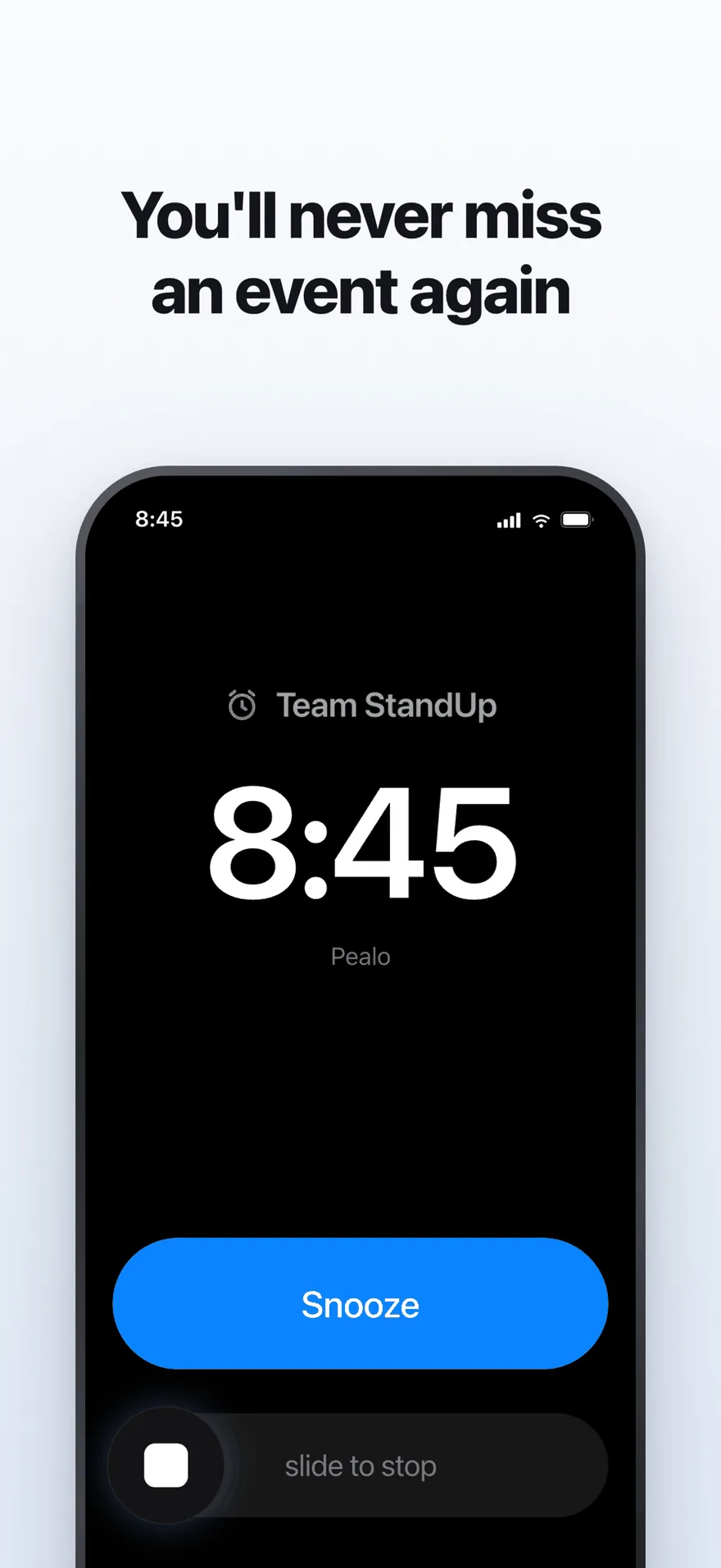
The alarm screen. It rings at full volume through Silent Mode and Focus.
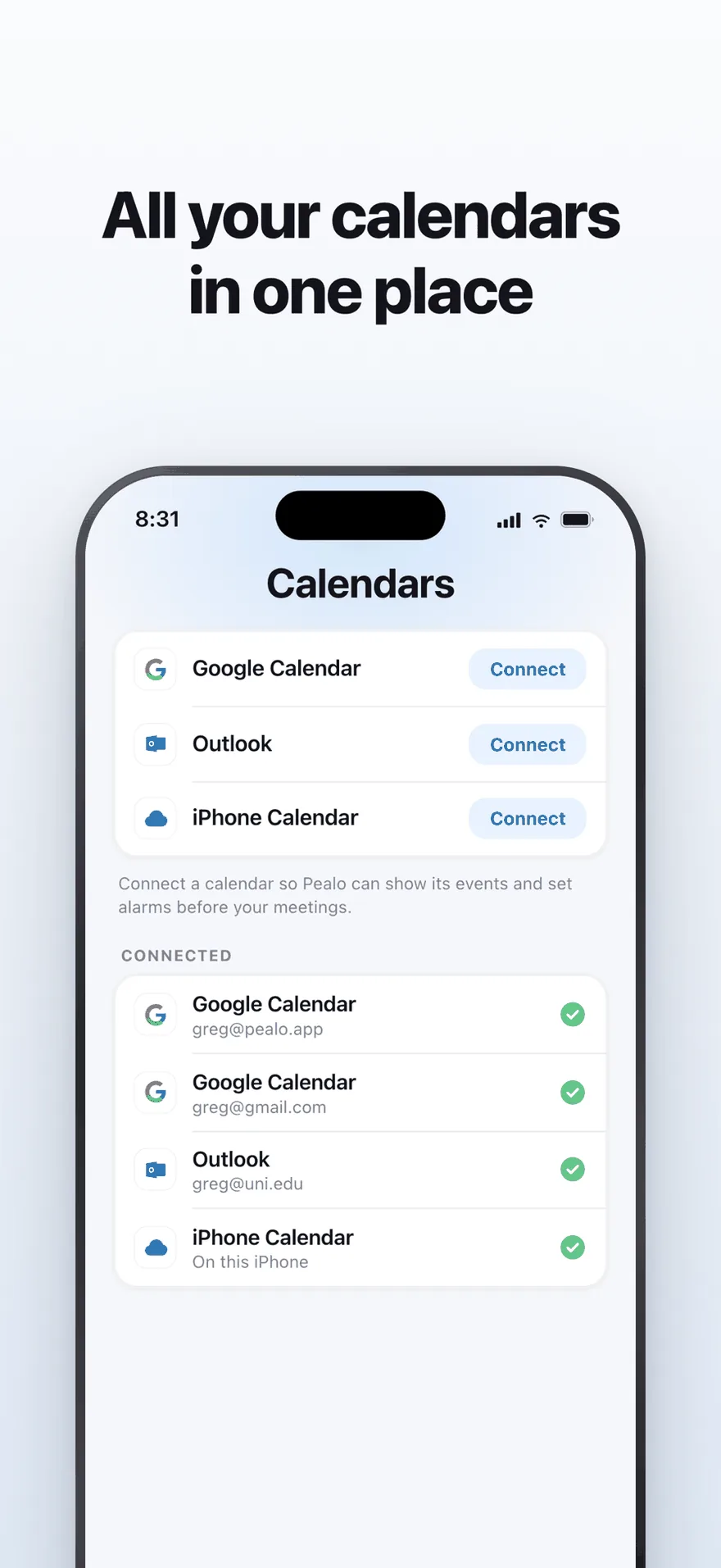
Google Calendar, Outlook and iPhone Calendar — several accounts at once.
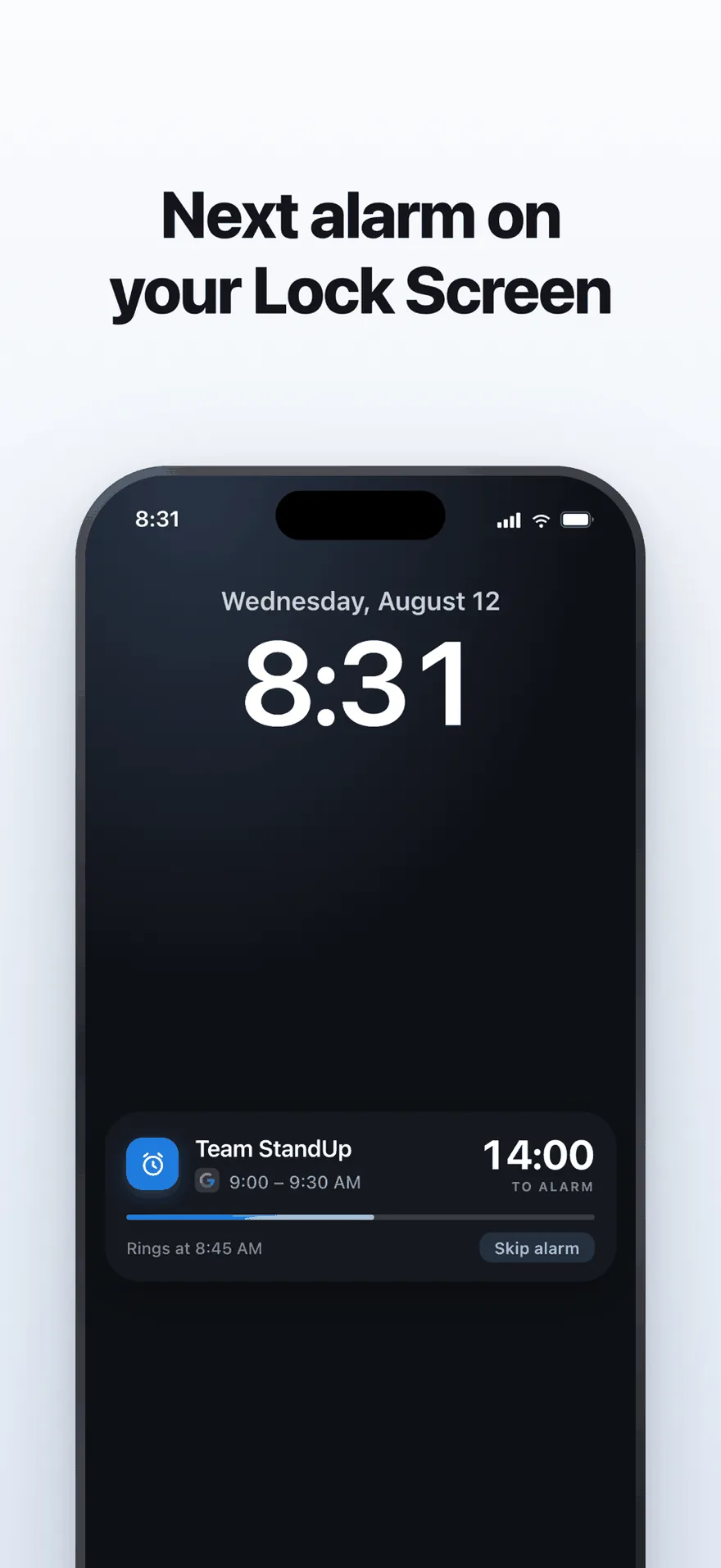
A live countdown on the Lock Screen, with one tap to skip an alarm.
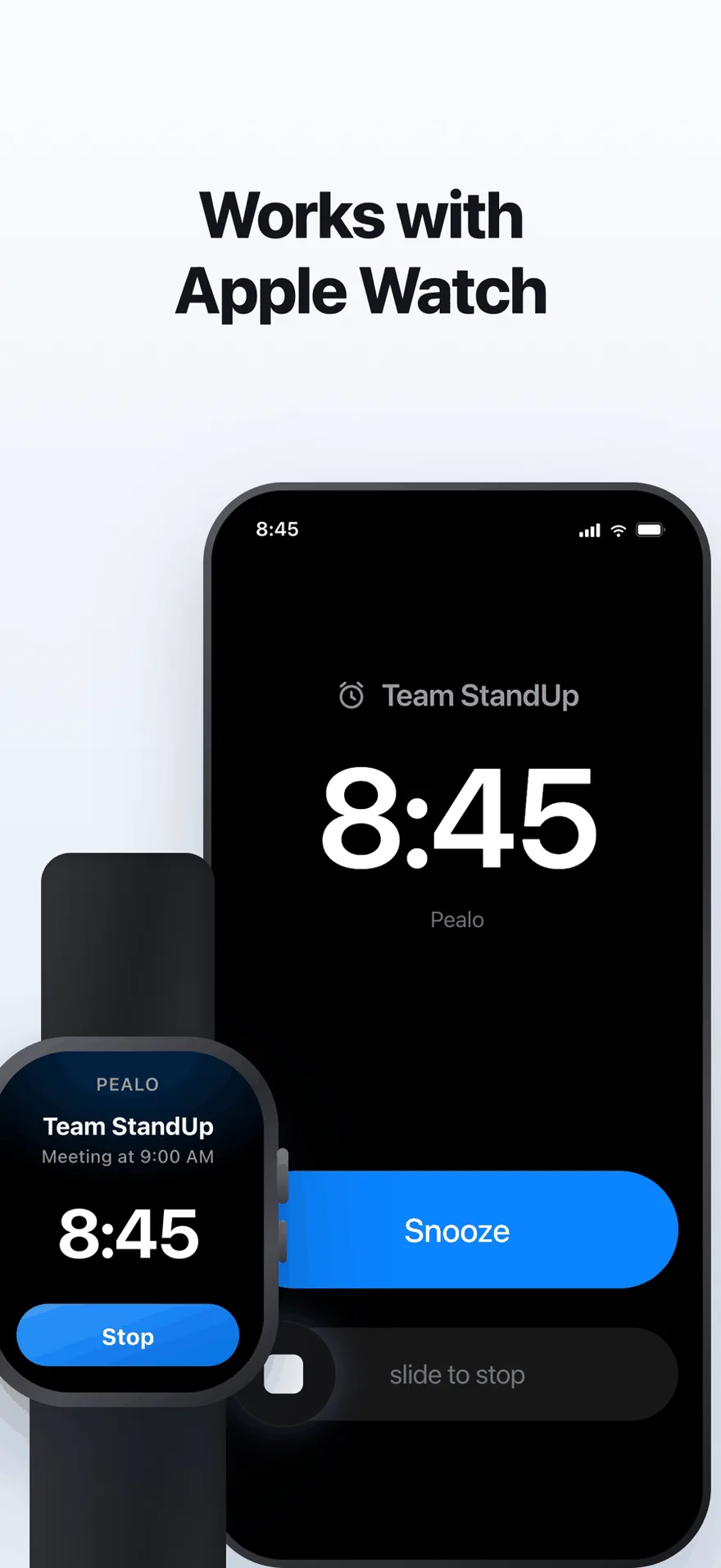
The same alarm on Apple Watch. No extra setup.
FAQ
Common questions
Why don't calendar reminders wake you up?
Because they are notifications. Silent Mode mutes notification sounds, Focus can hide the banner entirely, and the alert disappears after a second. Alarms are a separate category that overrides both.
What is the best calendar alarm app for iPhone?
Pealo if you keep several calendars that change weekly, since it connects Google, Outlook and iCloud at once and arms alarms automatically. The built-in Clock app is enough for a fixed schedule.
Can an app set alarms from my calendar automatically?
Yes. Pealo reads the calendars you connect and schedules a real system alarm before each event, updating them when meetings move or are cancelled.
Do alarms ring in Silent Mode and Focus?
Yes. Both iOS and Android let alarms through Silent Mode, Focus and Do Not Disturb. That is the difference between an alarm and a reminder.
Who writes these guides?
Greg Mroz, who builds Pealo. Every article says what it is based on and when it was last checked against current iOS and Android behaviour.
Reading about it is slower than trying it.
Connect one calendar and see a week of alarms arrive on their own.
Download on the App StoreSeven days free, then $49.99 a year
Pealo on every device